

- —No ratings yet
- 21Installs
- 1.3-r3Version
- 29.09.2021Updated
- 2 / 3Python
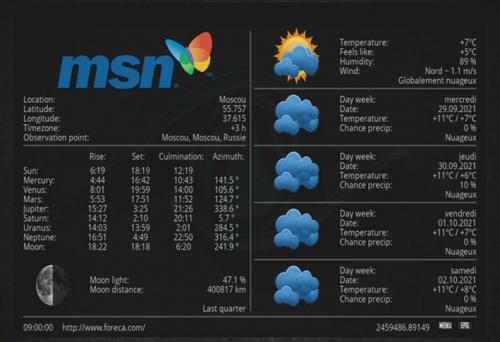
About Weather-Msn
The build Novaler publishes for its Multibox receivers on novaler.com.
Weather-Msn is in the Novaler category and runs on Python 2 and Python 3. It is free on the EnigmaPlay store for every common Enigma2 image (OpenATV, OpenPLi, OpenViX, EGAMI, OpenBH and more), and the store updates it as soon as a new version is out.
What's new
Source: موقع نوفالر (novaler.com) — الإصدار 1.3-r3
How to install Weather-Msn
On the receiver, with the EnigmaPlay store
Open EnigmaPlay, find Weather-Msn and press the green button on the remote. The store picks the right build for your image and keeps it updated. No store yet? Install it in a minute.
From your phone, no telnet
The EnigmaPlay Android app installs it on your receiver from the sofa. Get the app
With a telnet command
Copy the command and paste it into a telnet or SSH session on the receiver:
wget -O /tmp/p.ipk "https://raw.githubusercontent.com/Ahmadarjan1/EnigmaPlay-Repo/main/files/novaler-weather-msn/1.3-r3/enigma2-plugin-extensions-weather-msn_1.3-r3_PY2_3_mod_all.ipk" && opkg install --force-reinstall /tmp/p.ipk && rm -f /tmp/p.ipk
Ratings and comments
—No ratings yet
Rate Weather-Msn
- Loading comments…
More from Novaler
 AJPANELNovaler248 installs
 ArabicSaviorNovaler108 installs
 Key-AdderNovaler95 installs
 SubssupportNovaler87 installs
 Novaler StoreNovaler48 installs
 JediMakerXtreamNovaler44 installs
 Pluto TVNovaler32 installs
 NetspeedtestNovaler28 installs
 IP SATNovaler13 installs
 Athan TimesNovaler12 installs
 XC pluginNovaler11 installs
 NOVALER TVNovaler10 installs
More Novaler
-
AJPANELNovaler248 installs
-
ArabicSaviorNovaler108 installs
-
Key-AdderNovaler95 installs
-
SubssupportNovaler87 installs
-
Novaler StoreNovaler48 installs
-
JediMakerXtreamNovaler44 installs
-
Pluto TVNovaler32 installs
-
NetspeedtestNovaler28 installs
-
IP SATNovaler13 installs
-
Athan TimesNovaler12 installs
-
XC pluginNovaler11 installs
-
NOVALER TVNovaler10 installs